Giving instructions to LLMs
Prompts
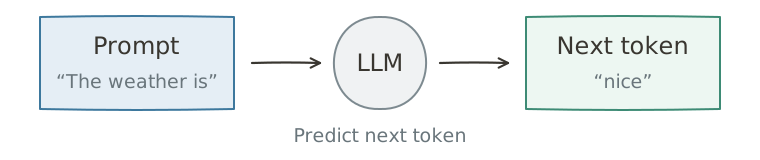
An LLM predicts tokens from its context. The same model can produce very different answers depending on what you provide and how you present it.
That input is the prompt. It may contain a question, background material, a task, constraints, and an expected output format.
These details affect the next-token distribution. Which information and conditions you supply can therefore change both an answer’s content and its form.
Types of messages
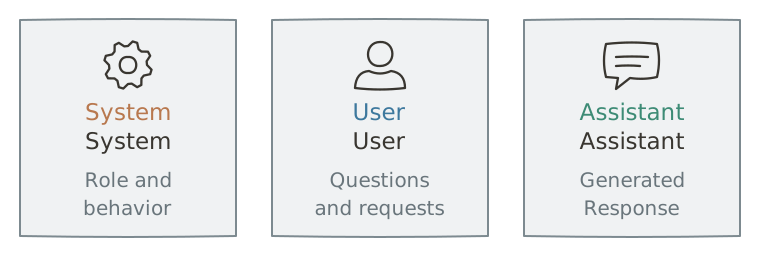
Chat models commonly distinguish messages by role, including system, user, and assistant. The role is part of the model’s input format, so the same text can be treated differently depending on where it appears. Exact roles and conventions vary by service.
System prompts
A system prompt sets the model’s role and overall behavior. Examples include “Answer in clear English” or “Use respectful language.”
The service developer usually supplies these instructions. Users do not need to repeat them with every question, and they may not see the system prompt directly.
User prompts
A user prompt is the user’s question or request. It can specify a task—“Summarize this in three sentences”—and supply source material or constraints. Clear instructions help communicate the desired result.
Assistant messages
Assistant messages are the model’s responses. A chat service can include earlier user and assistant messages in later requests, allowing the model to continue the conversation.
A conversation example
These roles work together. The user might enter:
The service may also provide a system prompt. The model uses both when generating its response.
Conversation context
Suppose you are planning a trip with a friend and ask, “What about Saturday?” Earlier messages tell your friend that you mean a travel date.
Context is the information needed to interpret a message. For an LLM, it is the material available when generating the current response.
After “What is machine learning?”, a request such as “Explain it more simply” makes sense because earlier messages are included again with the new request. The model can then identify what “it” refers to.
Context can also include documents, user-provided material, and information retrieved by tools. Missing relevant facts can reduce answer quality; excessive irrelevant material can distract from what matters.
Selecting, organizing, and retaining useful information is context management. As a task or conversation grows, the service must decide what to preserve, omit, or summarize. Some services compress older conversation into a summary.
Context size also affects processing time and cost. Good management aims to improve both answer quality and efficiency.
Common prompting techniques
Useful prompting involves choosing not just what to ask, but which information, examples, and constraints to include.
Few-shot prompting
Few-shot prompting supplies a few examples of the desired input-output pattern.
For example, ask for marketing copy from keywords:
Use the examples to write a short tagline for the final set of keywords.
Keywords: coffee, morning, energy\ Tagline: Wake up to a brighter morning.
Keywords: travel, freedom, discovery\ Tagline: Leave the familiar. Find something new.
Keywords: exercise, health, habit\ Tagline:
Examples communicate style, length, and how to combine the inputs. Choose examples that resemble the real task; different demonstrations can produce different results.
Structured prompting
A structured prompt separates elements such as role, goal, background, constraints, and output format.
A short instruction may suffice for a simple task. For a complex one, structure makes requirements easier for both the model and the person writing the prompt to inspect.
Role: Travel planner
Goal: Plan a three-day trip to Edinburgh
Travelers: A family of four, including two older adults
Constraints: Visit no more than three attractions per day and minimize travel time
Output: A table with morning, afternoon, and evening activities for each day
There is no mandatory template. The purpose is to make the task and its requirements clear.
Prompt chaining
Prompt chaining divides a complex task into stages and uses earlier outputs in later prompts.
For a report based on long source material:
- Extract key points.
- Build an outline from those points.
- Draft the sections.
- Review and revise the report.
Prompt 1 +
source material→key points
Prompt 2 +key points→outline
Prompt 3 +key points+outline→draft
Prompt 4 +draft→ review and revision
Intermediate results can be checked and corrected before continuing. However, multiple calls add complexity, latency, and cost, so chaining is most useful when the task genuinely benefits from stages.
Exercises
Decide whether each statement is True or False.
- A prompt supplies input context for a generative LLM’s next-token prediction.
- System prompts can set an overall role and behavior.
- Earlier assistant messages can never be used to generate the next answer.
- Few-shot prompting supplies examples of the desired task.
- Structured prompting means putting every requirement into one uninterrupted sentence.
Answers and explanations
- True — The input conditions the model’s generation.
- True — These instructions establish general guidance.
- False — Conversation history can be included in subsequent requests.
- True — Demonstrations communicate the intended pattern.
- False — Structure separates requirements into clear elements.