HTML
When we requested example.com with curl, the terminal printed a long block of text. With some formatting, it looks like this:
<!doctype html>
<html lang="en">
<head>
  <title>Example Domain</title>
  <link rel="icon" href="data:,">
  <meta name="viewport" content="width=device-width, initial-scale=1">
  <style>
    body {
      background: #eee;
      width: 60vw;
      margin: 15vh auto;
      font-family: system-ui, sans-serif;
    }

    h1 {
      font-size: 1.5em;
    }

    div {
      opacity: 0.8;
    }

    a:link,
    a:visited {
      color: #348;
    }
  </style>
</head>
<body>
  <div>
    <h1>Example Domain</h1>
    <p>This domain is for use in documentation examples without needing permission. Avoid use in operations.</p>
    <p><a href="https://iana.org/domains/example">Learn more</a></p>
  </div>
</body>
</html>
What is HTML?
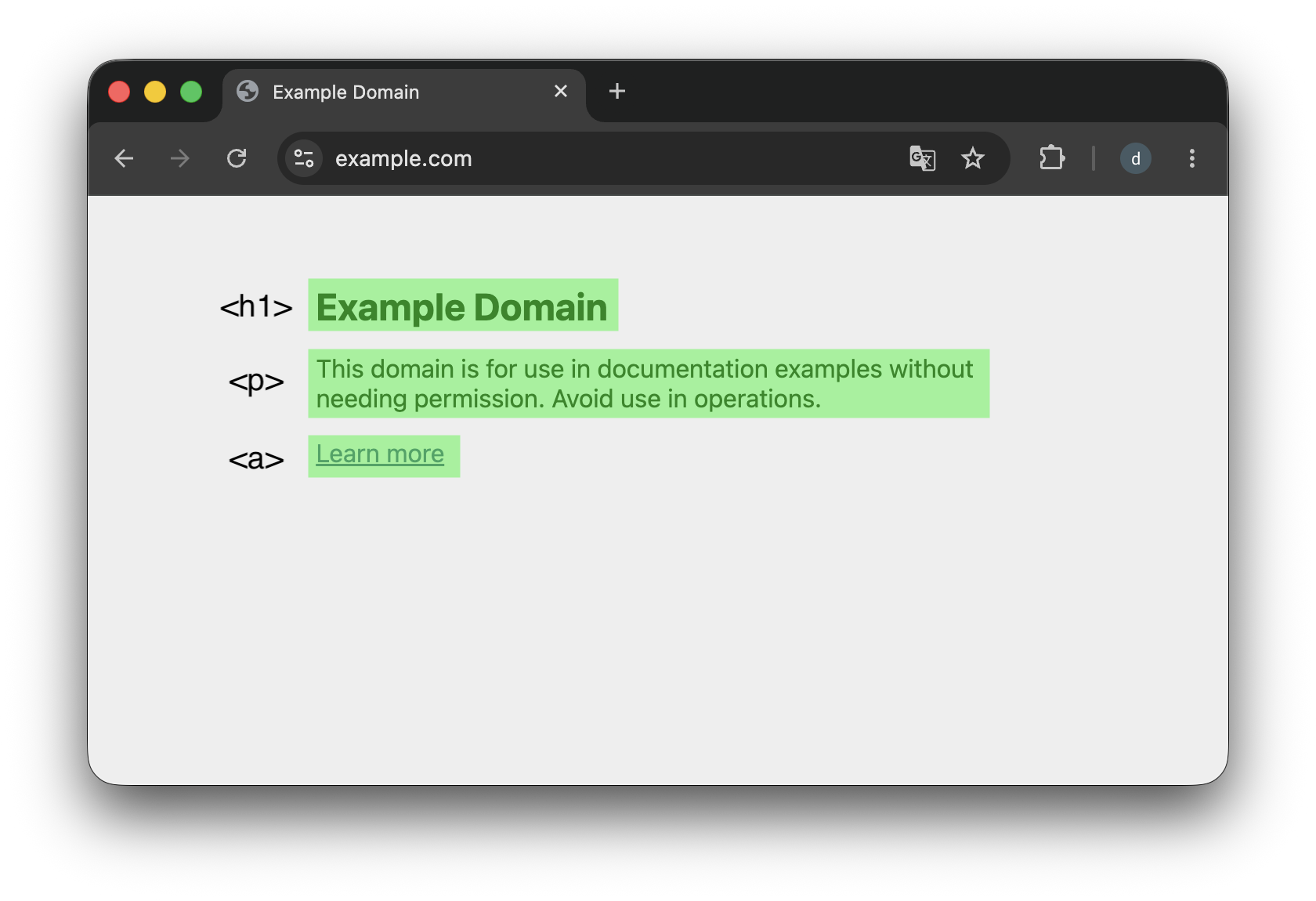
This document format is HTML (HyperText Markup Language). HTML is a markup language that describes a web page’s structure and content using predefined elements. Here, <h1> marks a heading, <p> marks a paragraph, and <a> marks a link. They correspond to the title, explanatory text, and “Learn more” link on the page.
Learning more HTML
This guide does not teach every detail of HTML syntax. For an introduction, see Basic HTML syntax on MDN.
HTML rendering
Why does the browser show a familiar web page instead of the HTML code? It reads the HTML and renders it into a visual layout. The browser can lay out the same document for different screen sizes and devices, making it comfortable to read in different settings.
The same process happens when you open Wikipedia. Your browser requests a page from its server. It receives HTML describing the page, rather than one large screenshot, and renders that HTML into the page you can read and interact with.
Content-Type
HTTP is not limited to HTML. Clients and servers can exchange images, JSON, video, and many other data formats. A server uses the Content-Type header to tell the client what kind of data its response contains.
For example, HTML is represented as text/html, while JSON uses application/json. Images and videos displayed on a web page also arrive through HTTP, with a Content-Type appropriate to their format.
JSON
JSON (JavaScript Object Notation) is a format for representing data using key: value pairs. For example, information about someone named Alex could look like this:
{
  "name": "alex",
  "age": 30,
  "email": "alex@example.com"
}
Most programming languages and systems support JSON, making it a common format for exchanging data between programs.
Exercises
Decide whether each statement is True or False.
- A browser interprets and renders the HTML it receives from a server to display a web page.
- HTTP can only carry HTML data.
Content-Typetells the client the format of the response data.
Answers and explanations
- True — The browser renders HTML into a page that people can read.
- False — HTTP can carry JSON, images, video, and many other formats.
- True — The server uses
Content-Typeto identify the response format, such as HTML or JSON.