Handling Responses
Our handlers return Python lists and dictionaries. For example, posts is a Python list containing two dictionaries. The response in a browser or Swagger UI looks similar, with brackets and braces, but it is actually JSON.
posts = [
    {
        'id': 1,
        'title': 'First post',
        'content': 'Starting my blog',
    },
    {
        'id': 2,
        'title': 'Second post',
        'content': 'Thanks for stopping by',
    },
][
{
"id": 1,
"title": "First post",
"content": "Starting my blog"
},
{
"id": 2,
"title": "Second post",
"content": "Thanks for stopping by"
}
]JSON Responses
HTTP defines how clients and servers exchange requests and responses. A client written in another language cannot directly read a Python list or dictionary. The server converts data into a shared format and puts it in the HTTP response body. JSON is a common choice for web APIs.
JSON (JavaScript Object Notation) is a text format for data. Its name comes from JavaScript, but many languages can read and write it. An array is an ordered sequence in square brackets []. An object contains key-value pairs in braces {}.
return posts produces JSON because FastAPI automatically converts the handler's return value into an appropriate JSON representation. It sends that JSON in the response body. The Python list becomes an array, and each post dictionary becomes an object.
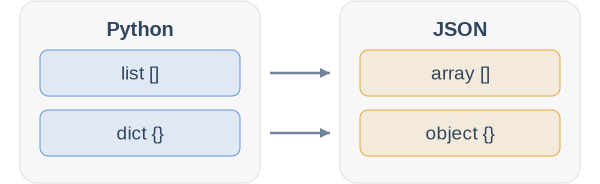
Try replacing the square brackets around posts with parentheses to make it a tuple.
posts = (
    {"id": 1, "title": "First post", "content": "Starting my blog"},
    {"id": 2, "title": "Second post", "content": "Thanks for stopping by"},
)
Save and reload /posts. FastAPI converts both lists and tuples to JSON arrays, so the response still uses []. After checking, change the parentheses back to brackets.
Common Python types and values map to JSON as follows:
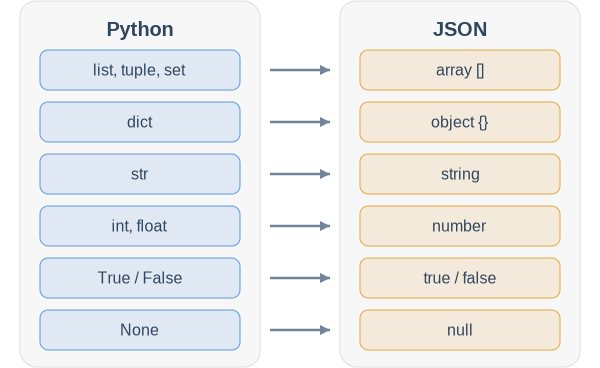
A set has no guaranteed order, so its resulting array has no guaranteed order either.
FastAPI can also return HTML pages and files. Web APIs commonly use JSON for data exchange. When a handler returns a JSON-compatible basic Python value, FastAPI converts it to JSON by default.
Response Models
FastAPI can validate returned data before sending it. If a required post ID is missing or has the wrong type, it returns a server error. Restricting response fields also prevents internal values from leaking to clients.
Use a response model to validate output and select its fields. As with request models, inherit from Pydantic's BaseModel. Define PostResponse below PostCreateRequest in main.py:
class PostResponse(BaseModel):
    id: int
    title: str
    content: str
Add response_model=PostResponse to the post creation decorator:
@app.post(
    "/posts",
    summary="Create a post",
    response_model=PostResponse,
)
def create_post_handler(body: PostCreateRequest):
    new_post = {
        "id": len(posts) + 1,
        "title": body.title,
        "content": body.content,
    }
    posts.append(new_post)
    return new_post
FastAPI validates new_post against PostResponse and includes only its declared id, title, and content fields.
Testing Response Validation
Change id in new_post as follows:
"id": "invalid",
Save, open POST /posts in Swagger UI, enter a title and content, and click Execute. The input passes validation, but the returned ID does not match the response model's integer type. Server response shows 500 Internal Server Error.
500 indicates a server-side failure. The client's input was valid, but the server created an invalid response. Unlike an input validation failure reported as 422, this is a bug in the server's output.
Check the development server's terminal logs for ResponseValidationError. It reports that the response ID should be an integer but received "invalid". Restore id to len(posts) + 1 afterward.
Checking Response Fields
Add a field intended only for internal use to new_post:
"internal_note": "Internal server note",
Save and run POST /posts again. Although the returned dictionary includes internal_note, Response body shows only the fields declared in PostResponse. Remove internal_note afterward.
Reusing Response Models
Our post APIs share a structure: ID, title, and content. We can reuse PostResponse wherever an API returns that structure.
Listing Posts
The list API returns multiple posts. Set response_model=list[PostResponse] on get_posts_handler. This describes a list whose items follow PostResponse; FastAPI validates each one.
@app.get(
    "/posts",
    summary="List all posts",
    response_model=list[PostResponse],
)
Retrieving One Post
Update the decorator on get_post_handler. Define response model classes above the decorators that use them.
@app.get(
    "/posts/{post_id}",
    summary="Get a post",
    response_model=PostResponse,
)
The returned post is validated against PostResponse in the same way.
Searching Posts
Search helps users find relevant information. Our search API returns posts whose title or content contains the supplied keyword.
There may be zero, one, or many matches. list[PostResponse] allows an empty list [] or a list of matching posts.
Python's in operator checks for a substring. For example, "blog" in "Starting my blog" is True. Use it to search each post's title and content.
@app.get(
    "/posts/search",
    summary="Search posts",
    response_model=list[PostResponse],
)
def search_posts_handler(topic: str = Query(min_length=2, max_length=20)):
    results = []
    for post in posts:
        if topic in post["title"] or topic in post["content"]:
            results.append(post)
    return results
Add a post to results if either field contains the search term. If none match, return [].
In Swagger UI, enter blog for topic. With the initial data, only the first post, whose content is “Starting my blog,” is returned.
This simple implementation teaches the basic idea. Production search must find relevant posts quickly among much larger datasets. Scanning every title and body on every request gets slower as posts become more numerous or longer.
Search also requires choices about meaning and presentation. Should “cell phone” match “smartphone” or related topics such as “mobile plans”? With no matches, should the service return nothing, suggest a spelling correction, or offer another search term?
Check Your Understanding
Decide whether each statement is true or false.
- FastAPI can convert both lists and tuples into JSON arrays.
- A return value that fails response model validation causes a server error.
- Declaring a response model still exposes every field in a returned dictionary.
- A list response model validates each item against the declared model.
- Returning an empty list requires a separate response model.
Answers and Explanations
- True — Both are represented as JSON arrays in square brackets.
- True — Response validation failures normally produce
500; server logs contain details. - False — FastAPI can filter output to the fields declared in the response model.
- True — Each item is validated against the specified item model.
- False — Unless a minimum length is required, a list model accepts an empty list.