Sign-Up
Services ask you to create an account so you can manage your posts or revisit your order history. An account lets you return later, retrieve your information, and pick up where you left off.
For the server, sign-up means storing a new account in the database. It records an identifier such as an email or username and usually accepts a password to verify the account owner at login.
Let's implement a sign-up API with FastAPI.
Creating the Users Table
First, define a table for user information. Add a User class inheriting from Base below Post in model.py.
from datetime import datetime

from sqlalchemy import DateTime, func


class User(Base):  # ①
    __tablename__ = "users"

    id: Mapped[int] = mapped_column(primary_key=True, autoincrement=True)  # ②
    email: Mapped[str] = mapped_column(String(256), unique=True)  # ③
    password_hash: Mapped[str] = mapped_column(String(256))  # ④
    created_at: Mapped[datetime] = mapped_column(  # ⑤
        DateTime, server_default=func.now()
    )
- ① One
Userobject corresponds to one row inusers. - ②
idis the primary key. The database assigns it when saving a new user. - ③
emailfinds the account at login.unique=Truemakes the database reject duplicate values, preventing multiple accounts with the same email. - ④
password_hashstores the value used to verify passwords. Its_hashsuffix indicates that it contains a hash rather than the original password. We will explain hashing below. - ⑤
created_atrecords sign-up time.server_default=func.now()asks the database to supply the current timestamp when inserting a row.
Create users the same way as posts. Activate the environment, navigate to model.py, and run:
$ python -i model.py
Enter these lines in interactive mode:
>>> from connection import engine
>>> Base.metadata.create_all(bind=engine)
On first creation, the terminal shows CREATE TABLE users.
Check that the table list includes users:
>>> from sqlalchemy import inspect
>>> inspect(engine).get_table_names()
['posts', 'users']
Press Ctrl+D to exit when finished.
Hashing Passwords
Passwords protect accounts. Many people reuse them across services, so a leak from one service can endanger accounts elsewhere. To reduce that risk, store a representation that makes the original password difficult to recover.
We still need to verify passwords when users return. Hashing helps: a mathematical algorithm transforms arbitrary-length input into a fixed-length hash value. Password hashing produces a representation from which recovering the original input is difficult.
For example, hashing hello with SHA-256 produces a value represented by 64 hexadecimal characters.

The same input and hash function produce the same result. However, recovering the input from the hash is very difficult. Cryptographic hash functions such as SHA-256 are designed to be one-way.
Even a small input change produces a very different hash. The SHA-256 hash of hello starts with 2cf24dba…, while Hello starts with 185f8db3….
At sign-up, hash and store the password. At login, hash the supplied password in the same way and compare it with the stored value. A match shows that the user knows the account's password.
Using pwdlib
We will use pwdlib for password hashing, with the Argon2 password hashing algorithm. Install both with the environment active:
$ pip install "pwdlib[argon2]"
Before writing our helper, explore the library in Python's interactive mode.
$ python
First, create a password hasher:
>>> from pwdlib import PasswordHash
>>> password_hasher = PasswordHash.recommended()
PasswordHash.recommended() uses the installed version's recommended settings. It currently selects Argon2 automatically.
Hash the same hello string twice and print each result:
>>> first_hash = password_hasher.hash("hello")
>>> second_hash = password_hasher.hash("hello")
>>> print(first_hash)
>>> print(second_hash)
hash() returns the hashed representation of its input.
The results differ even though the input is identical. Each operation applies a different salt.
Salts help defend against attacks such as rainbow table attacks. Because a hash function produces the same output for the same input, attackers can compare leaked hashes with precomputed results to guess passwords. A rainbow table uses precomputed hash information to help recover candidate inputs.

A salt is a random value included with the password during hashing. Different salts produce different hashes for the same password, making precomputed results difficult to reuse across accounts.
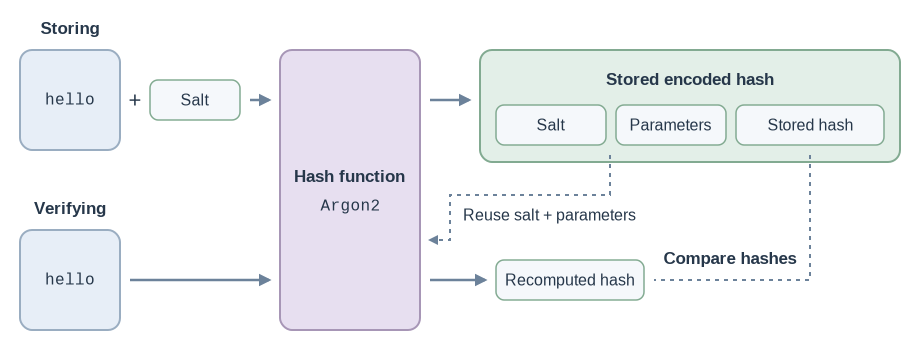
Each hash operation produces a different result. The encoded hash string stores the salt and hashing parameters alongside the hash. Verification reuses those stored values to hash the supplied password and compare it with the existing hash.
Press Ctrl+D to exit when finished.
Create password.py and define hash_password(). It accepts a plaintext password and returns its hashed representation.
from pwdlib import PasswordHash


password_hasher = PasswordHash.recommended()


def hash_password(password: str) -> str:
    return password_hasher.hash(password)
Implementing Sign-Up
In main.py, define UserResponse and the sign-up API:
class UserResponse(BaseModel):
    id: int
    email: str
    created_at: datetime


@app.post(
    "/users",
    summary="Sign up",
    response_model=UserResponse,
    status_code=status.HTTP_201_CREATED,
)
def signup_handler():
    pass
Our API will return the new user's information. Leaving password_hash out of UserResponse excludes it from the response. Password hashes should remain private too.
The client supplies an email and password. Define UserCreateRequest to receive them in the request body.
class UserCreateRequest(BaseModel):
    email: str
    password: str
Add body for the request and session with Depends(get_session) to the handler.
@app.post(
    "/users",
    summary="Sign up",
    response_model=UserResponse,
    status_code=status.HTTP_201_CREATED,
)
def signup_handler(
    body: UserCreateRequest,
    session: Session = Depends(get_session),
):
    pass
Now implement the body. First, add these imports to main.py:
from model import User
from password import hash_password
Create a User from the email and hashed password. Add it to the session, commit, and return new_user.
@app.post(
    "/users",
    summary="Sign up",
    response_model=UserResponse,
    status_code=status.HTTP_201_CREATED,
)
def signup_handler(
    body: UserCreateRequest,
    session: Session = Depends(get_session),
):
    new_user = User(
        email=body.email,
        password_hash=hash_password(body.password),
    )
    session.add(new_user)
    session.commit()
    return new_user
Start the server and send the following body to POST /users in /docs:
{
    "email": "user@example.com",
    "password": "mypassword"
}
Check for 201 Created with id, email, and created_at. Confirm that neither password nor password_hash appears in the response.
Check Your Understanding
Decide whether each statement is true or false.
- A unique column allows the same value in multiple rows.
- Salting can produce different hashes for the same password.
- A response model can restrict which object fields are returned.
- Passwords are safe to expose in API responses once hashed.
- New objects added to a session need a commit to finalize their storage.
Answers and Explanations
- False — A unique constraint rejects duplicate values.
- True — Different salts change the resulting hashes.
- True — The response model determines which fields are included.
- False — Leaked hashes can help attackers test password guesses and should remain private.
- True — Adding registers an object; committing finalizes the transaction.