Login
Login lets users prove ownership of an account with an identifier, such as an email or username, and a password. Once verified, they can access their own data. For example, a banking service shows an authenticated user their account balance and transaction history.
Verifying Passwords
At login, verify that the supplied password matches the stored hash. The verify() method from pwdlib returns True for a match and False otherwise.
Use it to add verify_password() to password.py:
def verify_password(password: str, password_hash: str) -> bool:
    return password_hasher.verify(password, password_hash)
Implementing Login
Define LoginRequest in main.py to receive an email and password in the body.
class LoginRequest(BaseModel):
    email: str
    password: str
Start with this login API:
@app.post(
    "/login",
    summary="Log in",
)
def login_handler(
    body: LoginRequest,
    session: Session = Depends(get_session),
):
    pass
First, look up an account by email. If none exists, return 404 Not Found.
@app.post(
    "/login",
    summary="Log in",
)
def login_handler(
    body: LoginRequest,
    session: Session = Depends(get_session),
):
    statement = select(User).where(User.email == body.email)
    user = session.scalar(statement)
    if user is None:
        raise HTTPException(
            status_code=status.HTTP_404_NOT_FOUND,
            detail="Account not found.",
        )
session.execute(statement).scalar() can be shortened to session.scalar(statement), combining execution and retrieval of the first value.
Pass the supplied body.password and stored user.password_hash to verify_password(). Return 401 Unauthorized if they do not match.
from password import verify_password
@app.post(
    "/login",
    summary="Log in",
)
def login_handler(
    body: LoginRequest,
    session: Session = Depends(get_session),
):
    statement = select(User).where(User.email == body.email)
    user = session.scalar(statement)
    if user is None:
        raise HTTPException(
            status_code=status.HTTP_404_NOT_FOUND,
            detail="Account not found.",
        )

    if not verify_password(body.password, user.password_hash):
        raise HTTPException(
            status_code=status.HTTP_401_UNAUTHORIZED,
            detail="Incorrect password.",
        )
If these checks pass, the account exists and the password matches. We have verified that the user knows the account's credentials.
Staying Logged In
In an online store, you stay logged in while browsing products and viewing your cart. You do not re-enter your email and password on every page.
HTTP is stateless: requests are independent, and earlier request state is not automatically preserved. A server cannot automatically know that a later request comes from the user who just logged in. We need a way to identify that user on subsequent requests.
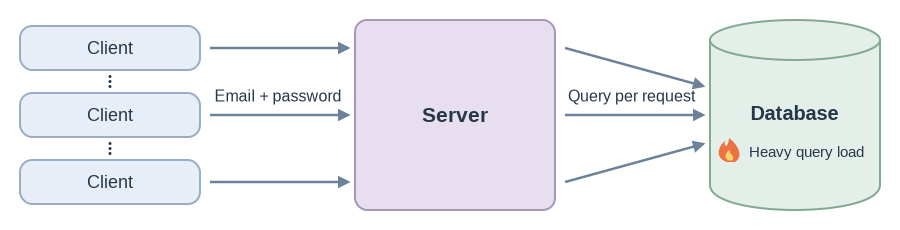
The simplest approach is sending account credentials with every protected request, such as a balance lookup. But each request would require another database query and password verification, adding server load. Imagine repeating that for every request from 100,000 concurrent users.
Instead, issue an access token with a limited lifetime after successful login. Think of visiting another company's office: after checking your identity, reception issues a temporary visitor badge. You can then show it to enter permitted areas.
Likewise, the server issues a token after login. The client includes it with later protected requests. The server validates it to identify the user, avoiding repeated password checks.
JWT
A common format for access tokens is JWT (JSON Web Token). It carries user information in a compact string and supports efficient creation and verification.
The JWTs we use have three sections separated by dots (.).
header.payload.signature
- Header: metadata such as the token type and signing algorithm.
- Payload: information carried by the token. Each item is called a claim.
- Signature: a value used to detect tampering.
The payload carries data. Access tokens commonly include a subject identifying whom the token was issued for and an expiration time. Other information can be added when creating a token.
The payload is Base64url-encoded, which is not encryption. Anyone with the token can decode it. Never include passwords or other sensitive information. An account ID can identify the user without exposing credentials.
Base64url
Base64url represents data using URL-friendly characters, including letters, digits, -, and _. For example, a+b/c, which contains characters with special URL meanings, encodes to YStiL2M. Decoding recovers a+b/c.
Encoding alone would let anyone create a fake token with arbitrary information, like printing a counterfeit visitor badge. A signature lets the server check that the token comes from a trusted issuer and has not been altered.
With the shared-secret method used here, the header and payload are combined with a secret known to the issuer and verifier to calculate a signature using a hash-based algorithm. Someone without the secret can read or change the data, but cannot readily produce a valid signature for changed content.
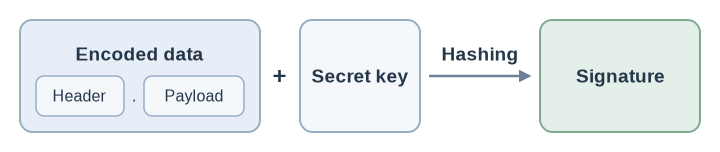
The server recalculates the signature with the same key and algorithm and compares it with the token's signature. A match confirms that it was signed with that key and has not been altered.
Creating Access Tokens
Install PyJWT with the virtual environment active:
$ pip install PyJWT
Generate a signing key. This command prints 32 random bytes as a 64-character hexadecimal string:
$ python -c "import secrets; print(secrets.token_hex(32))"
Create authentication.py alongside main.py. Replace SECRET_KEY with the generated value.
from datetime import datetime, timedelta, timezone

import jwt


SECRET_KEY = "replace-with-your-generated-secret-key"
ALGORITHM = "HS256"
TOKEN_EXPIRE_HOURS = 24


def create_access_token(user_id: int) -> str:
    expires_at = datetime.now(timezone.utc) + timedelta(hours=TOKEN_EXPIRE_HOURS)
    payload = {
        "sub": str(user_id),
        "exp": expires_at,
    }
    return jwt.encode(payload, SECRET_KEY, algorithm=ALGORITHM)
create_access_token() accepts a user ID. It stores that ID as a string in sub and a UTC expiration 24 hours from now in exp. Choose a lifetime suited to the service: a sensitive banking service might use a short interval such as 15 minutes, while a less sensitive service may allow longer.
jwt.encode() signs the payload using the secret key and algorithm. We use HS256, which signs and verifies with the same secret.
Completing the Login API
After checking the password, pass the user ID to create_access_token() and return the token to the client.
from authentication import create_access_token
Define LoginResponse. access_token contains the token, and token_type is bearer. Bearer authentication allows whoever possesses the token to use it. Here, we use a JWT as a Bearer access token.
class LoginResponse(BaseModel):
    access_token: str
    token_type: str
Add the response model and return the token:
@app.post(
    "/login",
    summary="Log in",
    response_model=LoginResponse,
)
def login_handler(
    body: LoginRequest,
    session: Session = Depends(get_session),
):
    statement = select(User).where(User.email == body.email)
    user = session.scalar(statement)
    if user is None:
        raise HTTPException(
            status_code=status.HTTP_404_NOT_FOUND,
            detail="Account not found.",
        )

    if not verify_password(body.password, user.password_hash):
        raise HTTPException(
            status_code=status.HTTP_401_UNAUTHORIZED,
            detail="Incorrect password.",
        )

    access_token = create_access_token(user.id)
    return {"access_token": access_token, "token_type": "bearer"}
Start the server and open POST /login in /docs. Send the email and password used at sign-up.
{
    "email": "user@example.com",
    "password": "mypassword"
}
Check for 200 OK, a JWT in access_token, and bearer in token_type.
The client can now use the token to identify the logged-in user on later requests. Keep it handy in a text editor for the upcoming exercises.
Consistent Login Errors
Currently, an unknown email produces 404, while a wrong password produces 401. Many services deliberately avoid telling users which credential was wrong.
Specific errors can help attackers. Learning that an email exists lets them focus password guesses on that account. Return the same status and message for both failures to avoid revealing account existence.
Update the API so a missing account and a password mismatch both return the same 401 Unauthorized response:
@app.post(
    "/login",
    summary="Log in",
    response_model=LoginResponse,
)
def login_handler(
    body: LoginRequest,
    session: Session = Depends(get_session),
):
    statement = select(User).where(User.email == body.email)
    user = session.scalar(statement)
    if user is None or not verify_password(body.password, user.password_hash):
        raise HTTPException(
            status_code=status.HTTP_401_UNAUTHORIZED,
            detail="Incorrect email or password.",
        )

    access_token = create_access_token(user.id)
    return {"access_token": access_token, "token_type": "bearer"}
This hides account existence and the specific failure reason in the response, making the interface safer.
Check Your Understanding
Decide whether each statement is true or false.
- Password verification checks whether a supplied password corresponds to a stored hash.
- HTTP automatically remembers a login across requests.
- A JWT payload is encrypted, so it is safe to include passwords.
- A shared-secret token's signature can be verified by recalculating it with the same key.
- Distinct login errors can reveal whether an account exists.
Answers and Explanations
- True — Verification checks the supplied password against the stored representation.
- False — HTTP is stateless; maintaining identity requires an additional mechanism.
- False — Base64url is encoding. Anyone holding the token can read its payload.
- True — Comparing the calculated signature detects changes to signed content.
- True — Attackers can use different responses to identify registered accounts.