Authentication
Users now receive an access token after login and can use it to access their data. Our user and post tables are still separate. Let's add authorship so only logged-in users can create posts, and users can update or delete only their own posts.
Adding Post Authors
In a relational database, a foreign key connects tables by referencing a key in another table.
Add a user_id column to posts to store the author's user ID. A foreign key referencing users.id lets us identify who wrote each post.
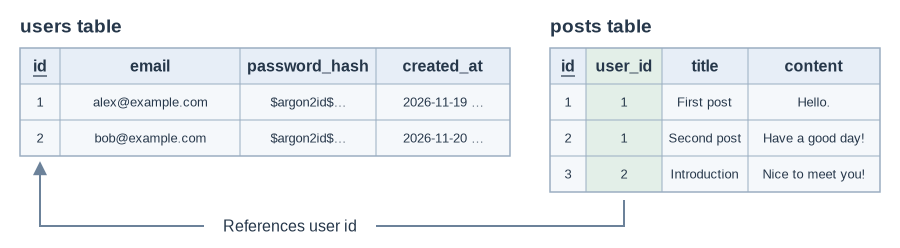
Add user_id to the Post model in model.py:
from sqlalchemy import ForeignKey, String, Text
from sqlalchemy.orm import DeclarativeBase, Mapped, mapped_column


class Post(Base):
    __tablename__ = "posts"

    id: Mapped[int] = mapped_column(primary_key=True, autoincrement=True)
    user_id: Mapped[int] = mapped_column(ForeignKey("users.id"))
    title: Mapped[str] = mapped_column(String(100))
    content: Mapped[str] = mapped_column(Text)
When adding a foreign key column to an existing table, older rows have no value for it. One approach is to allow NULL using nullable=True while introducing the column.
For simplicity, we will drop and recreate posts. This deletes existing post data but preserves accounts in users.
With your environment active, navigate to model.py and open interactive mode:
$ python -i model.py
Drop and recreate the table:
>>> from connection import engine
>>> Post.__table__.drop(bind=engine)
>>> Base.metadata.create_all(bind=engine)
The new table includes user_id. Press Ctrl+D to exit when finished.
Extracting the User ID from a Token
Saving a post now requires user_id. The creation API will validate an access token and save its user's ID as the author, allowing only logged-in users to create posts.
The access token already contains the user ID. Clients must send it with protected API requests so the server can validate it and identify the user.
First, add a helper to extract the user ID in authentication.py:
from fastapi import HTTPException, status
from jwt.exceptions import InvalidTokenError


def decode_access_token(token: str) -> int:
    try:
        payload = jwt.decode(
            token,
            SECRET_KEY,
            algorithms=[ALGORITHM],
            options={"require": ["sub", "exp"]},
        )
        return int(payload["sub"])
    except (InvalidTokenError, ValueError):
        raise HTTPException(
            status_code=status.HTTP_401_UNAUTHORIZED,
            detail="Invalid access token.",
            headers={"WWW-Authenticate": "Bearer"},
        )
jwt.decode() validates the signature and expiration using the token, secret, and allowed algorithm. It returns the payload as a dictionary. The require option makes sub and exp mandatory.
sub contains the user ID stored during token creation. Convert its string value to an integer and return it.
Invalid signatures, expired tokens, and missing required claims raise InvalidTokenError or a subclass. An ID that cannot be converted raises ValueError. Return 401 Unauthorized in these cases, with a WWW-Authenticate header indicating Bearer authentication.
Requiring an Access Token
Clients send access tokens in an HTTP header when calling protected APIs:
Authorization: Bearer <access token>
FastAPI can extract authentication information from headers, just as it reads paths, queries, and bodies. HTTPBearer checks the Bearer format in Authorization and extracts the token. Use Depends(bearer) to receive it, then validate it inside the post creation handler.
from fastapi.security import HTTPAuthorizationCredentials, HTTPBearer

from authentication import decode_access_token


bearer = HTTPBearer()


@app.post(
    "/posts",
    summary="Create a post",
    response_model=PostResponse,
    status_code=status.HTTP_201_CREATED,
)
def create_post_handler(
    credentials: HTTPAuthorizationCredentials = Depends(bearer),
    body: PostCreateRequest = Body(),
    session: Session = Depends(get_session),
):
    user_id = decode_access_token(credentials.credentials)

    new_post = Post(
        user_id=user_id,
        title=body.title,
        content=body.content,
    )
    session.add(new_post)
    session.commit()
    return new_post
FastAPI calls HTTPBearer and passes its result to credentials. credentials.credentials is the access token string without the Bearer prefix. Validate it and save the returned user ID as the post's author.
We can wrap extraction and validation in another dependency function. Move bearer to authentication.py and add authenticate(), which returns the user ID.
from fastapi import Depends
from fastapi.security import HTTPAuthorizationCredentials, HTTPBearer


bearer = HTTPBearer()


def authenticate(
    credentials: HTTPAuthorizationCredentials = Depends(bearer),
) -> int:
    return decode_access_token(credentials.credentials)
from authentication import authenticate


@app.post(
    "/posts",
    summary="Create a post",
    response_model=PostResponse,
    status_code=status.HTTP_201_CREATED,
)
def create_post_handler(
    user_id: int = Depends(authenticate),
    body: PostCreateRequest = Body(),
    session: Session = Depends(get_session),
):
    new_post = Post(
        user_id=user_id,
        title=body.title,
        content=body.content,
    )
    session.add(new_post)
    session.commit()
    return new_post
Depends(authenticate) tells FastAPI to call authenticate(). Its parameter also uses Depends(bearer), so FastAPI first calls bearer to extract header credentials. FastAPI resolves nested dependencies in the required order.
authenticate() validates the token and returns an ID, which FastAPI passes to the handler's user_id. Missing or invalid tokens reject the request before the handler runs. The handler can focus on saving the post using that ID.
Let's create a post. Start the server, call the login API in /docs, and copy access_token from the response.
With HTTPBearer registered, /docs shows an Authorize button at the top right. Click it, paste the token into Value, and click Authorize. Enter only the token, without Bearer. Close the dialog; protected requests now include the Authorization header.
Send this body to POST /posts:
{
  "title": "My authenticated post",
  "content": "I created this post while logged in."
}
Check for 201 Created and the new post. The server assigns its author from the token without accepting a user_id in the body.
Open Authorize, click Logout, and repeat the request. It should fail authentication without creating a post.
Updating Only Your Own Posts
Add Depends(authenticate) to the update API and allow changes only when the author ID matches the authenticated user.
@app.patch(
    "/posts/{post_id}",
    summary="Update a post",
    response_model=PostResponse,
)
def update_post_handler(
    user_id: int = Depends(authenticate),
    post_id: int = Path(ge=1),
    body: PostUpdateRequest = Body(),
    session: Session = Depends(get_session),
):
    statement = select(Post).where(Post.id == post_id)
    post = session.scalar(statement)

    if post is None:
        raise HTTPException(
            status_code=status.HTTP_404_NOT_FOUND,
            detail="Post not found.",
        )

    if post.user_id != user_id:
        raise HTTPException(
            status_code=status.HTTP_403_FORBIDDEN,
            detail="You can only update your own posts.",
        )

    if body.title is not None:
        post.title = body.title
    if body.content is not None:
        post.content = body.content

    session.commit()
    return post
If post.user_id differs from user_id, return 403 Forbidden. Authentication identifies the user; this additional check determines whether they have permission to update that post.
In /docs, update a post you own. Then sign up and log in with another account, replace the token in Authorize, and try the same post again. It should return 403 Forbidden.
Deleting Only Your Own Posts
Add Depends(authenticate) to the delete API and permit deletion only when the author ID matches the authenticated user.
@app.delete(
    "/posts/{post_id}",
    summary="Delete a post",
    status_code=status.HTTP_204_NO_CONTENT,
)
def delete_post_handler(
    user_id: int = Depends(authenticate),
    post_id: int = Path(ge=1),
    session: Session = Depends(get_session),
):
    statement = select(Post).where(Post.id == post_id)
    post = session.scalar(statement)

    if post is None:
        raise HTTPException(
            status_code=status.HTTP_404_NOT_FOUND,
            detail="Post not found.",
        )

    if post.user_id != user_id:
        raise HTTPException(
            status_code=status.HTTP_403_FORBIDDEN,
            detail="You can only delete your own posts.",
        )

    session.delete(post)
    session.commit()
If the IDs differ, return 403 Forbidden. After authentication, we separately check permission to delete the resource.
Try deleting your own post in /docs. To test the rejection, use a second account's token to request deletion of another user's existing post. It should return 403 Forbidden.
Check Your Understanding
Decide whether each statement is true or false.
- A foreign key can represent a relationship by referencing a key in another table.
- Reading a JWT payload is enough to trust the user without checking its signature.
- Bearer authentication can send a token in the Authorization header.
- A FastAPI dependency can itself depend on another dependency.
- A logged-in user automatically has permission to update or delete other users' posts.
Answers and Explanations
- True — Foreign keys connect related records across tables.
- False — Anyone can read or construct a payload; validate the signature and expiration.
- True — Use the
Authorization: Bearer <token>format. - True — FastAPI resolves nested dependencies and passes their results onward.
- False — Authentication establishes identity. Authorization separately determines permitted actions.